What is Earn?
The Earn feature is a secure investment solution introduced by ZebPay, that provides various earning options to its users for earning returns on their crypto asset holdings. Think of ZebPay Earn as your crypto savings account. Hold your crypto assets with us, and receive a fixed return.
Where Can I find this option?
You can find the 'Earn' option on both the app and the web.
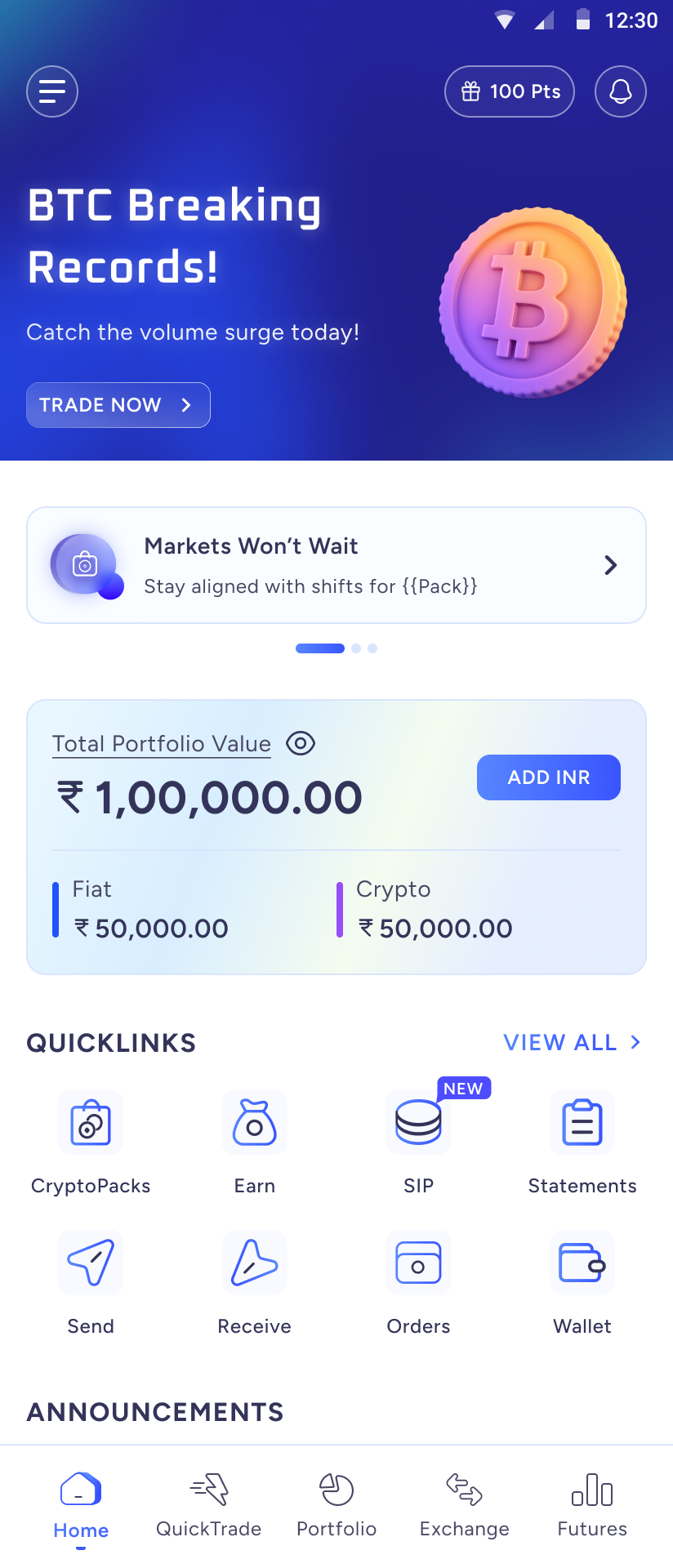
On the app, go to the Home page and scroll down. You will see an option labeled 'Earn' under 'Quicklinks'.
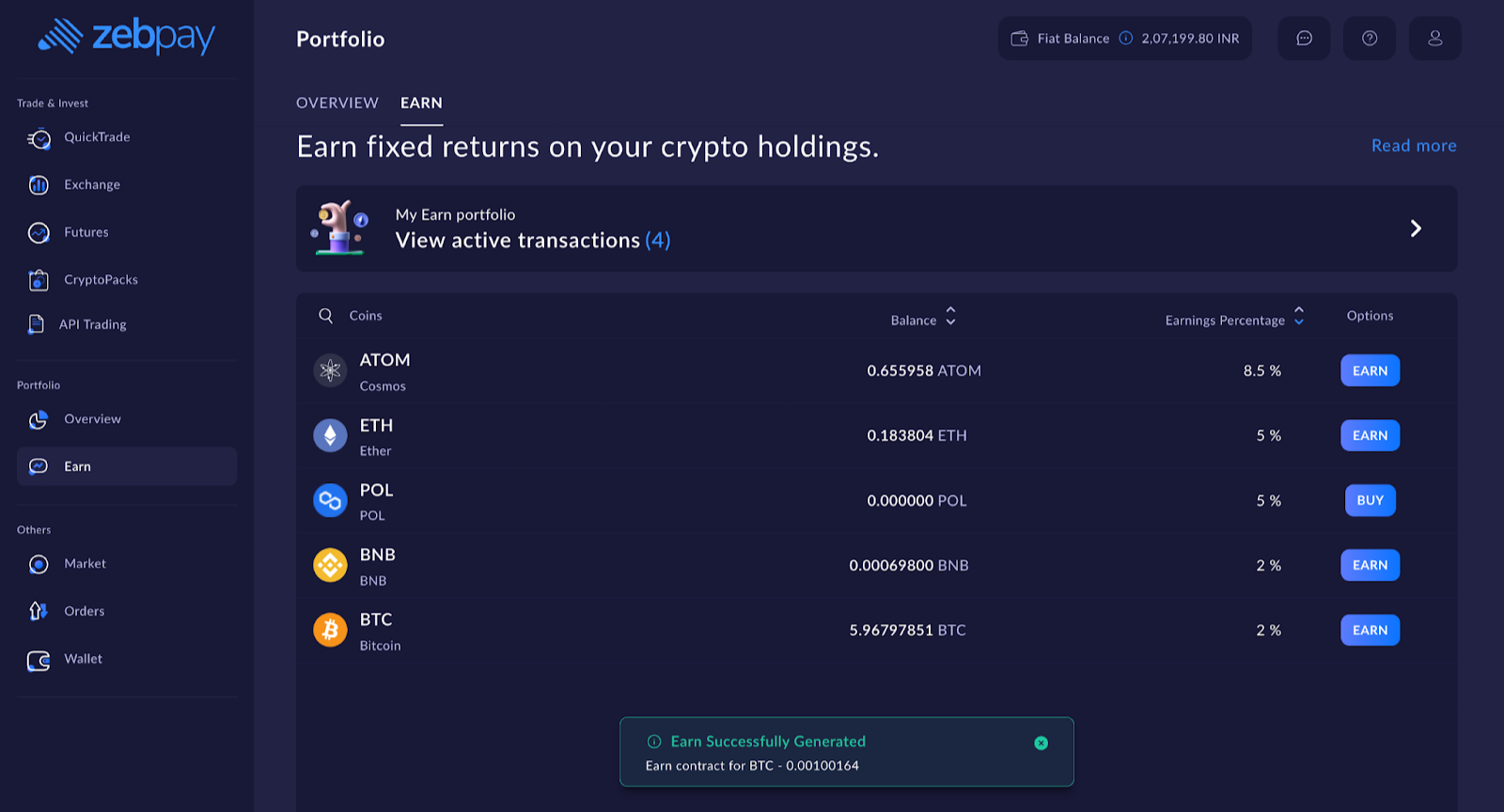
On the web, you will find the 'Earn' option under the 'Portfolio' section in the left-hand menu.
How are the earnings calculated on this?
A deposit on ZebPay’s Earn feature unlocks the power of passive earnings from your crypto asset holdings. Under a fixed-term deposit, you can deposit your crypto assets with us for up to 90-day periods.
These earnings are calculated on the volume of your crypto asset holdings. As a result, they can be used to enhance your earnings when the price of a token goes up. Alternatively, they add a safety factor against a price drop by ensuring a certain amount of earnings.
Which crypto assets can I invest in ZebPay's Earn feature?
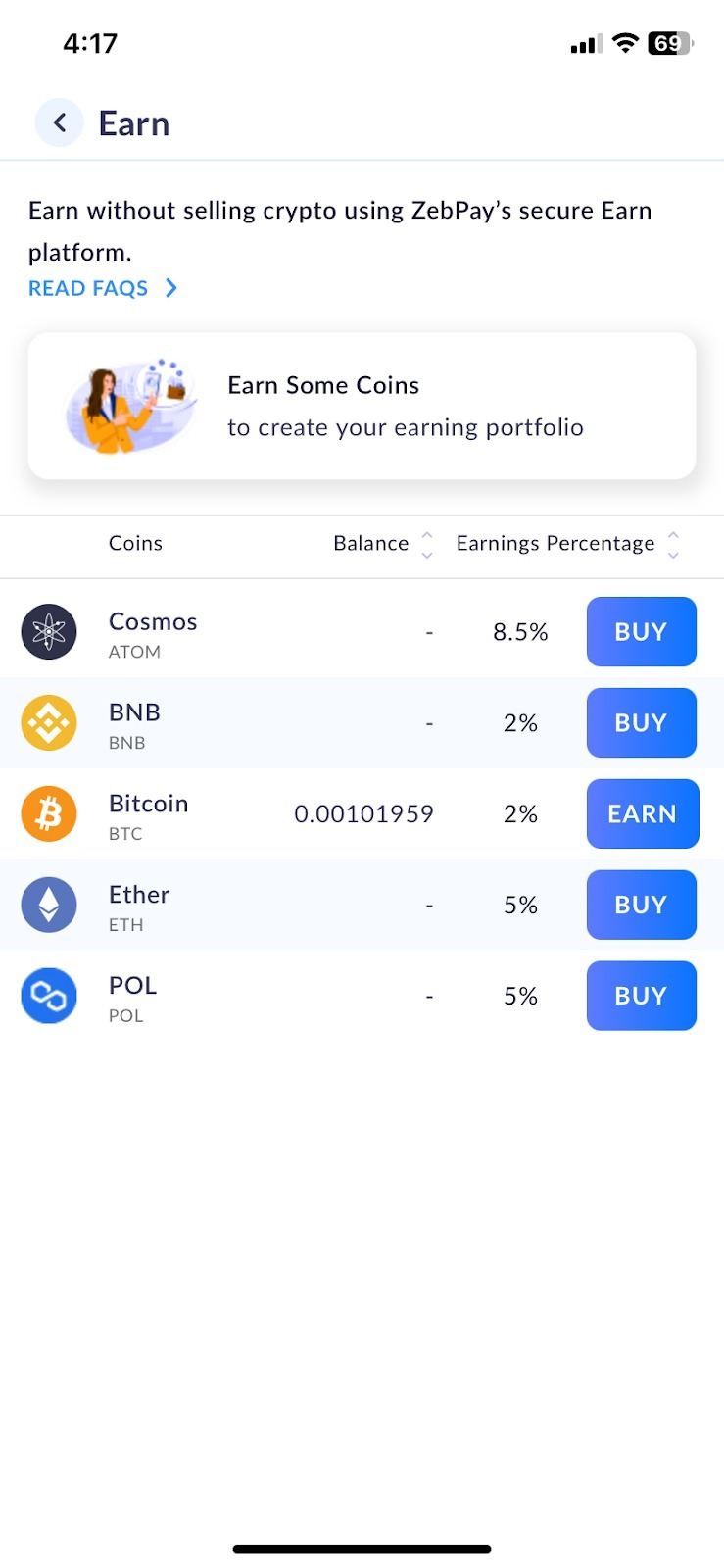
Currently, we are supporting the following crypto assets:
- ATOM (Cosmos)
- BNB (Binance Coin)
- BTC (Bitcoin)
- ETH (Ether)
- POL (Polygon)
- TRX (TRON)
- ADA (Cardano)
- USDT (USDT)
- INJ (INJ)
- SOL (Solana)
What are the minimum and maximum tenure for the deposits?
The minimum term is 30 days and then we have 60 and 90 days terms. ZebPay Earn is available in the following formats:
Fixed Term: The Earn transaction ends on expiry of the selected term.
Fixed Term with Auto-Renewal: The Earn transaction is automatically renewed on expiry of each term.
What is the annualized earnings percentage yield (APY)?
The annualized earnings percentage means the percentage of earnings that you may receive on the crypto assets invested by you under the Earn Program.
How to deposit crypto assets for ZebPay Earn?
1. On the app, click on the hamburger menu at the top left corner. You will see an option labeled 'Earn' under 'Crypto Actions'.
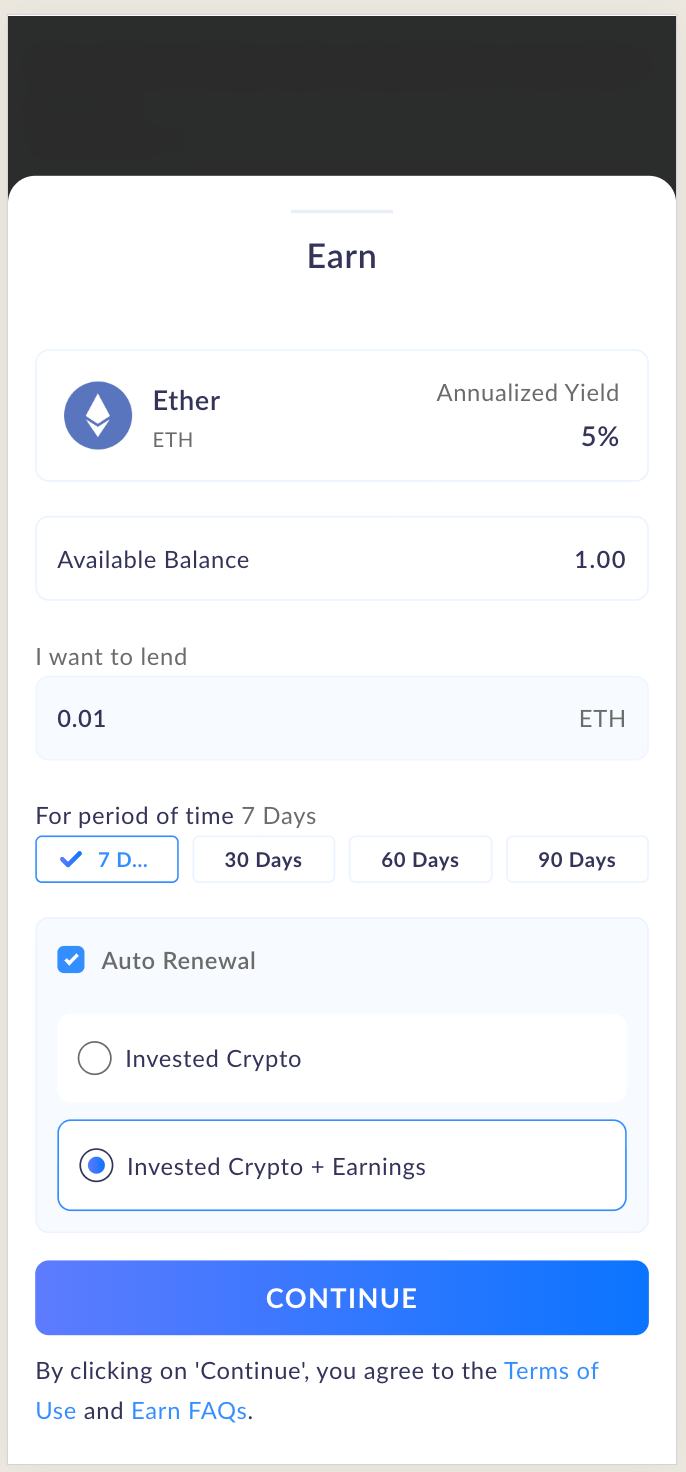
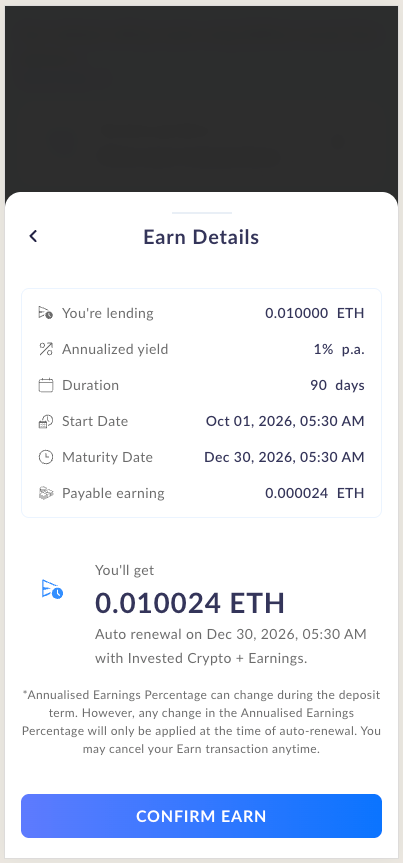
2. Tap on Earn. Enter the quantity of crypto assets and select the number of days. If you want to enable auto-renewal of the contract, select the Auto-Renewal option and select the option of invested crypto (or) invested crypto + earnings. Then tap on ‘Continue’. By tapping on ‘Continue’, you agree to the Terms of Use and Earn FAQs.
3. Tap on ‘Confirm Earn’ to place an order. Enter the PIN to initiate the Earn transaction.
How to exit an active Earn?
1. Click on ‘View your transactions’:
2. Click on ‘Exit’ against the Earn transaction you wish to end (the “Exit Option”). Your invested crypto will be credited to your ZebPay wallet on the same day.
FAQS:
Q. Is there a penalty for early withdrawal of crypto asset holdings?
- No, there is no penalty for early withdrawal.If you exercise the Exit Option before the end of your term, your entire invested crypto will be returned to you. Your earnings will be treated as follows:
Fixed Term: No earnings will be paid.
Fixed Term with Auto-Renewal: Earnings will be paid only for the terms fully completed before the date of exit.
Q. Is there a minimum deposit limit for each token?
- Yes, there are minimum limits for each crypto asset. Please click here to know the limits.
Q. What is the earnings percentage on these deposits?
- Annualised earning percentage depends on the crypto asset holdings and the time period you invest it for. For exact rates of earning percentage, please refer to the app.
Q. Would the earnings percentage change for all customers?
- Any change in the earnings percentage will only be applied at the time of auto-renewal.
Q. How will the earnings be calculated?
- Earnings would be calculated for a 24-hour period starting from 00:00 UTC to 23:59 UTC and will start at 00:00 hrs UTC from the start date of the Earn transaction.
Q. When will the earnings be credited to my account under a Fixed Term?
- Under a Fixed Term, your invested crypto, together with the total accrued earnings will be credited to your ZebPay wallet between 00:00 and 02:00 UTC on expiry of the term.
Q. What happens when Auto-Renewal is enabled?
- On expiry of each term, your Earn transaction is automatically renewed for a further term of the same duration, at the annualised earnings percentage prevailing on ZebPay on the date of renewal. At the time of deposit, you may elect to renew either:
Invested crypto only: only your invested crypto is renewed, and the earnings for the completed term are credited to your ZebPay wallet; or
Invested crypto together with earnings: the earnings for the completed term are added to your invested crypto and renewed together.
The Earn transaction will continue to renew until you exercise the Exit Option or ZebPay exercises its Closing Option.
Q. Can ZebPay close my Earn transaction before the end of the term?
- Yes. ZebPay may close an active Earn transaction before the end of the term (the “Closing Option”) by notifying you on your registered email address at least one day in advance. Your entire invested crypto will be returned without any deduction, together with the earnings accrued up to the date of closure.
ZebPay may also close an Earn transaction with immediate effect if:
Your ZebPay account is closed, terminated or blacklisted by ZebPay; or
In ZebPay's sole discretion, the invested crypto is at risk of being classified as a security, derivative or other regulated financial instrument, or of becoming subject to regulation that materially impacts the Earn transaction or ZebPay’s business.
Q. Can ZebPay make changes to the Earn terms?
-Yes. ZebPay may change the Earn terms by notifying you at your registered email address.
Need help? We are always here for you. Reach us at https://help.zebpay.com/support/tickets/new
Was this article helpful?
That’s Great!
Thank you for your feedback
Sorry! We couldn't be helpful
Thank you for your feedback
Feedback sent
We appreciate your effort and will try to fix the article